CPPA vs. Honda: What the Enforcement Order Reveals About OneTrust’s Cookie Consent Tool
This article breaks down the Honda cookie banner mistakes that led the CPPA to flag OneTrust’s setup as CCPA violations. Explore the key compliance issues.
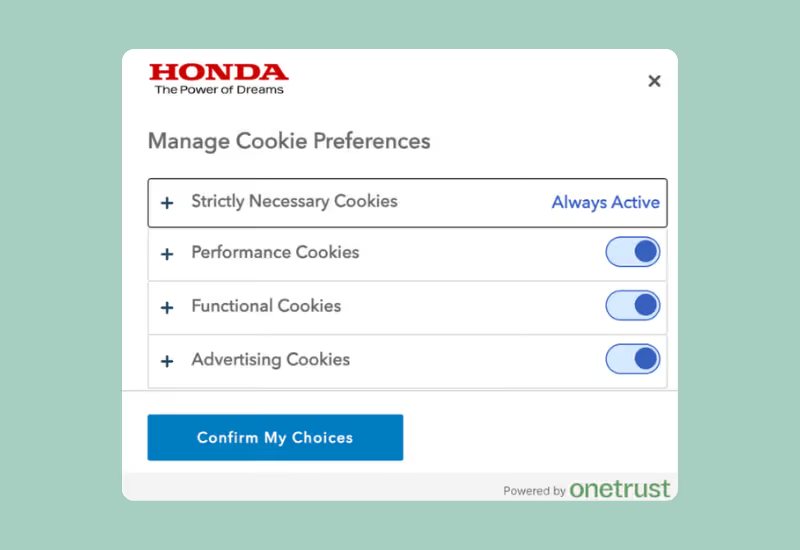
On March 7, 2025, the California Privacy Protection Agency (CPPA) issued a $632,500 enforcement penalty against American Honda Motor Co. for violations of the California Consumer Privacy Act (CCPA). While the CPPA cited multiple compliance issues, only one system in Honda’s tech stack was explicitly attributed to a third-party vendor: the cookie consent tool, provided by OneTrust.
“Honda contracts with OneTrust, a third-party compliance vendor, to provide a cookie management tool for its Honda and Acura websites.”
— CPPA Enforcement Order, Point #53
This article highlights the specific features in Honda’s OneTrust-configured cookie banner that the CPPA determined to be non-compliant with the CCPA.
What the CPPA Found Wrong with OneTrust’s Cookie Banner
The CPPA’s findings are detailed in Section C of the enforcement order (Points #53–65). Below are the specific features that triggered violations—each drawn directly from the order.
1. Opt-Out Requires Two Steps
“Honda’s cookie management tool fails to provide symmetrical choice when it comes to Consumers’ ability to submit Requests to Opt-Out of Sale/Sharing and for obtaining Consumers’ consent”
— Point #65
- Users had to:
- Toggle advertising cookies off
- Click “Confirm My Choices”
- The CPPA noted that this created friction and violated the requirement that consumer opt-out mechanisms be easy to execute.
Where OneTrust Was Involved:
This two-step flow was implemented using OneTrust’s cookie banner.
2. Opt-In is Easier Than Opt-Out
“Consumers only need to take one step [to opt-in] by clicking ‘Allow All.’”
— Point #58
- The “Allow All” button enabled all tracking with a single click.
- This asymmetry between opt-in and opt-out paths is not allowed under the CCPA.
Where OneTrust Was Involved:
The one-click “Allow All” function was part of the OneTrust configuration.
3. No “Decline All” Button
“A method is not equal or symmetrical because it allows ‘Accept All’ in one step, but requires additional steps to exercise privacy rights.”
— Point #62
- The interface provided “Allow All,” but no equivalent “Decline All” option.
- According to the CPPA, this undermines a user’s ability to exercise meaningful choice and is non-compliant.
Where OneTrust Was Involved:
The lack of a one-click “Decline All” option stemmed from the OneTrust-powered UX.
Summary: Non-Compliant Features in OneTrust’s Cookie Banner
Why This Matters
These were not vague usability concerns or theoretical risks. These were direct violations that occurred within a system powered by OneTrust, according to the CPPA’s official findings.
For businesses using OneTrust today, the key question is this:
Is your current OneTrust deployment compliant with how the CPPA enforces the CCPA/CPRA?
The Honda case shows that common configurations and perhaps even default settings may not meet California’s legal standards.
How TrueVault Handles It Differently
At TrueVault, our Consent Management Platform isn’t just engineered—it’s designed and built by attorneys who understand exactly how regulators interpret the law. We translate the letter of the CCPA/CPRA into product behavior that stands up to enforcement scrutiny.
- Compliant by default
- “Decline All” and “Accept All” are presented side by side
- Opt-in and opt-out flows require the same number of clicks
- GPC signals automatically trigger a browser opt-out.
The difference isn’t just in UX—it’s in enforcement-proof architecture, backed by legal expertise.

Ready to Switch from OneTrust?
Get a demo to see how TrueVault simplifies privacy compliance.Or learn more about TrueVault vs. OneTrust, or why TrueVault is the best privacy compliance platform for midsize businesses.
Use TrueVault Privacy Compliance Software for Free
For a limited time, we're offering to buy out your existing software contract. Sign up with TrueVault and use our platform for free until your current contract ends.
Privacy work that stays current — without adding more chaos.
TrueVault helps lean ecommerce teams keep privacy workflows current as vendors, tracking tools, and privacy laws keep changing.